SSMS templates, a gem you probably aren't using
How do you keep track of the queries you need to run regularly?
SQL Server Management Studio has a Template Explorer feature that you probably have never seen. Which is a pity, because it can be a real time saver.
Accessing the Template Explorer
The Template Explorer is available under the View menu or Ctrl-Alt-T for the keyboard fans.

Now you have the "Template Browser" panel open, feel free to mock the inconsistent name from the menu to the actual panel title.

Using a template
How do you add extended properties to a table? Sure, you can punch that into AltaVista or whatever search engine you use and you'll get hits for MSDN and StackOverflow but what if you didn't have to go there? You don't, in fact. It was right there on your machine, a perfect example waiting for you in the Template Explorer.

Heaven forbid, what if you didn't have access to the internet? I know I don't install help files anymore and the few times I'm flying, I'm pretty far from having internet access. Double click on "Add Extended Properties to Table" and the following query gets pushed into a new SSMS query pane.
1: -- =========================================
2: -- Add Extended Properties to Table template
3: -- =========================================
4: USE <database, sysname, AdventureWorks>
5: GO
6:
7: IF OBJECT_ID('<schema_name, sysname, dbo>.<table_name, sysname, sample_table>', 'U') IS NOT NULL
8: DROP TABLE <schema_name, sysname, dbo>.<table_name, sysname, sample_table>
9: GO
10:
11: CREATE TABLE <schema_name, sysname, dbo>.<table_name, sysname, sample_table>
12: (
13: <columns_in_primary_key, , c1> <column1_datatype, , int> <column1_nullability,, NOT NULL>,
14: CONSTRAINT <contraint_name, sysname, PK_sample_table> PRIMARY KEY (<columns_in_primary_key, , c1>)
15: )
16: -- Add description to table object
17: EXEC sys.sp_addextendedproperty
18: @name=N'MS_Description',
19: @value=N'<table_description_value,,Table description here>' ,
20: @level0type=N'SCHEMA',
21: @level0name=N'<schema_name, sysname, dbo>',
22: @level1type=N'TABLE',
23: @level1name=N'<table_name, sysname, sample_table>'
24: GO
25:
26: -- Add description to a specific column
27: EXEC sys.sp_addextendedproperty
28: @name=N'MS_Description',
29: @value=N'<column_description,,Column description here>' ,
30: @level0type=N'SCHEMA',
31: @level0name=N'<schema_name, sysname, dbo>',
32: @level1type=N'TABLE',
33: @level1name=N'<table_name, sysname, sample_table>',
34: @level2type=N'COLUMN',
35: @level2name=N'<columns_in_primary_key, , c1>'
36: GO
Ok, now what?

All of those beautiful
<parameter, [type], value>
in the above mean something to SSMS. They are template parameters and to unlock their power, hit Ctrl-Shift-M.
The resulting pop-up window looks like
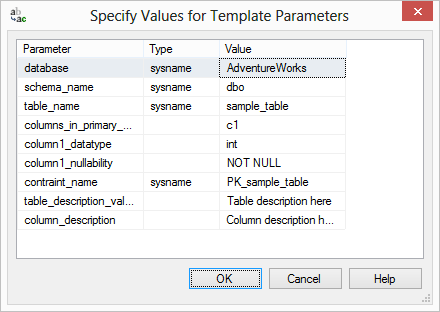 Compare the first row in that replace window to line 4 of the template query-all that SSMS did was parse out the 3 values between the < and the > and assume that what's in between is getting replaced. It's not fool proof but it's "good enough."
Really using templates
There's nothing stopping you from making your own templates. Think about it, how do you keep track of all your queries? For my money, I'm using Templates. Currently, I have 4
SSMSTemplate folders available on my dropbox site.
- 45NewTSQLFeatures - this was my first attempt at a template library. I had a SQL Saturday presentation on 45 new language features in 2005 and 2008 in 45 minutes. Now it's my syntax reference for those features
- SSIS - I built this out for my 2012 PASS Summit Lightning talk. It allows me to deploy .ispac files into the new SSISDB as well as tear it all down
- Sweets - this is my SQL Saturday presentation on the new language features in SQL Server 2012.
- Utility - this a work in progress but the basic idea is that with my new job, I'm going to be walking into lots of strange, new environments and I'll need to be able to hit the ground running. I took Brent Ozar's concept of sp_blitz and added in all the other scripts I might need to handle whatever is thrown at me.
Installation
After Template Explorer is first opened, SSMS will create the basic structure in your AppData folder. If you can't see it, take the training wheels off Windows Explorer and show hidden folders. For my account and SQL Server 2012, they were installed in C:\Users\bfellows\AppData\Roaming\Microsoft\SQL Server Management Studio\110\Templates. Download the folders to your Templates folder and restart SSMS (it only scans for files when it is first opened).
Making your own
In the Template Browser, right click in the background and you will have an option for New and there you can either create a new script or folder. Right-click and select Edit to change a template, otherwise you'll only be changing a copy and not the original.


