A blog about SQL Server, SSIS, C# and whatever else I happen to be dealing with in my professional life.

Find ramblings

Showing posts with label TSQL. Show all posts

Wednesday, May 3, 2023

Formatting a date in SQL Server with the Z indicator

Formatting a date in SQL Server with the Z indicator

It seems so easy, I was building json in SQL Server and the date format for the API specified it needed to have 3 millsecond digits and the zulu timezone signifier. Easy peasy, lemon squeezey, that is ISO8601 with time zone Z format code 127

SELECT CONVERT(char(24), GETDATE(), 127) AS waitAMinute; Running that query yields something like 2023-05-02T10:47:18.850 Almost there but where's my Z? Hmmm, maybe it's because I need to put this into UTC? SELECT CONVERT(char(24), GETUTCDATE(), 127) AS SwingAndAMiss;

Running that query yields something like 2023-05-02T15:47:18.850 It's in UTC but still no timezone indicator. I guess I can try an explict conversion to a datetimezone and then convert to 127.

SELECT CONVERT(char(24), CAST(GETUTCDATE() AS datetimeoffset) , 127) AS ThisIsGettingRidiculous , CAST(GETUTCDATE() AS datetimeoffset) AS ControlValue;

Once again, that query yields something like 2023-05-02T15:47:18.850 and I can confirm the ControlValue aka unformatted looks like 2023-05-02 15:47:850.7300000 +00:00 We have timezone info, just not the way I need it.

Back to the documentation, let's ready those pesky footnotes.

8 Only supported when casting from character data to datetime or smalldatetime. When casting character data representing only date or only time components to the datetime or smalldatetime data types, the unspecified time component is set to 00:00:00.000, and the unspecified date component is set to 1900-01-01. 9 Use the optional time zone indicator Z to make it easier to map XML datetime values that have time zone information to SQL Server datetime values that have no time zone. Z indicates time zone at UTC-0. The HH:MM offset, in the + or - direction, indicates other time zones. For example: 2022-12-12T23:45:12-08:00.

Those don't appply to me...Oh, wait, they do. In the Z notation is only used for converting stringified dates into native datetime types. There is no cast and convert style code to output a formated ISO 8601 date with the Z indicator.

So what do you do? Much of the internet just proposes using string concatenation to append the Z onto the string and move on. And that's what a rational developer would do but I am not one of those people.

Solution

If you want to get a well formatted ISO8601 with the time zone Z indicator, the one-stop-shop in SQL Server will be the FORMAT function because you can do anything there!

SELECT FORMAT(CAST(D.val AS datetimeoffset), 'yyyy-MM-ddThh:mm:ss.fffZ') AS WinnerWinnerChickenDinner , FORMAT(CAST(D.val AS datetime2(3)), 'yyyy-MM-ddThh:mm:ss.fffZ') AS OrThis FROM ( VALUES ('2023-05-02T15:47:18.850Z') )D(val);

The final thing to note, the return type of FORMAT is different. It defaults to nvarchar(4000) whereas lame string concatenation yields us the right length (24) but the wrong type as concatenation changed our char to varchar. If we were storing this to a table, I'd add a final explicit cast, in either case, to be char(24). There's no unicode values to worry about nor will it ever be shorter than 24 characters.

SELECT DEDFRS.name, DEDFRS.system_type_name FROM sys.dm_exec_describe_first_result_set ( N'SELECT FORMAT(CAST(D.val AS datetimeoffset), ''yyyy-MM-ddThh:mm:ss.fffZ'') AS LookMaUnicode , CONVERT(char(23), CAST(D.val AS datetimeoffset), 127) + ''Z'' AS StillVarChar FROM ( VALUES (''2023-05-02T15:47:18.850Z'') )D(val);' , N'' , 1) AS DEDFRS;

Filed under, "I blogged about it, hopefully I'll remember the solution"

Thursday, December 22, 2022

Counting a character in a column

Counting a character in a column

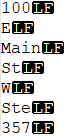
I ran into an issue today that I wanted to write about so that maybe I remember the solution. We ran into a case where the source data in a column had an unprintable character. In this case, it was a line feed character, which is ASCII value 10, and they had 7 instances in this one row. "How did that get in there? Surely that's an edge case and we can just ignore it," and dear reader, I've been around long enough to know that this is likely a systemic situation. To count the number of line feeds in a single row, for a single column, I can just copy the value into NotePad++ or the like, display all characters, and simpely count.

A screenshot of a text editor. It displays 7 lines of information, each with a black LF at the end
100
E
Main
St
W
Ste
357

Now, let's count how many line feeds are in a table with 23.5 million rows by hand - Any takers? Exactly. The trick to this solution is that we're going to make use of the REPLACE function to substitute the empty string for all of the values we want to count. We'll then compare the difference in string lengths between the original and the final.

SELECT
    *
FROM
(
    -- Generate our data
    SELECT
        CONCAT('100', CHAR(10), 'E', CHAR(10), 'Main', CHAR(10), 'St', CHAR(10), 'W', CHAR(10), 'Ste', CHAR(10), '357', CHAR(10) ) AS InputString
) D0
CROSS APPLY
(
    -- What is the difference in string length?
    SELECT
        LEN(D0.InputString) - LEN(REPLACE(D0.InputString, CHAR(10), '')) AS LFCount
)D1;

This solution is elegant in that you only require one pass through a table to figure out the number. Plus, if you want to do the same computation in other languages that may not have a count function or equivalent available for strings, it likely supports a REPLACE operation.

Is there any other way?

Sure but none of them seem to perform as well.

STRING_SPLIT

Assuming you're on SQL Server 2014?+ the second parater to STRING_SPLIT will be the character to split. Intuitively, I think this might be a more obvious solution. What do we want to do? Count how many times a character exists in a field. If we break the field up into multiple rows and then count how many rows were generated, Bob's your uncle!

SELECT
    *
FROM
(
    SELECT
        CONCAT('100', CHAR(10), 'E', CHAR(10), 'Main', CHAR(10), 'St', CHAR(10), 'W', CHAR(10), 'Ste', CHAR(10), '357', CHAR(10) ) AS InputString
) D0
CROSS APPLY
(
    SELECT
        COUNT_BIG(SS.value) AS LFCount
    FROM
        STRING_SPLIT(D0.InputString, CHAR(10)) AS SS
)D1;

What I don't like is the performance. Running those two queries against my original table, it took about 30 seconds to compute the REPLACE's results and 70 seconds for the STRING_SPLIT.

Number table

I'm not going to go find my notes on how to use a number table to perform the same split operation as string_split but I can already tell you, it won't perform as well as string_split and we've already covered that one isn't going to cut it.

I want to count spaces or I'm dealing with unicode data

Fun, but documented, twist --- LEN is not going to count trailing white space. And while I'm a dumb 'murican, unicode length is different so you should probably use DATALENGTH instead, but then divide by 2.

SELECT
    *
FROM
(
    -- Generate our data
    -- We are now using char(32), aka space, as our delimiter
    -- and tacking on an extra 100 at the end
    -- and we set our type to be nchar
    SELECT
        CONCAT(CAST('100' AS nchar(3)), CHAR(32), 'E', CHAR(32), 'Main', CHAR(32), 'St', CHAR(32), 'W', CHAR(32), 'Ste', CHAR(32), '357', CHAR(32), space(100) ) AS InputString
) D0
CROSS APPLY
(
    SELECT LEN(D0.InputString) AS IncorrectLength
    ,   DATALENGTH(D0.InputString)/2 AS CorrectLength
)D01
CROSS APPLY
(
    -- What is the difference in string length?
    SELECT
        (DATALENGTH(D0.InputString) - DATALENGTH(REPLACE(D0.InputString, CHAR(32), '')))/2 AS SpaceCount
    ,   (LEN(D0.InputString) - LEN(REPLACE(D0.InputString, CHAR(32), ''))) AS SpaceCountWrong
)D1;

Can you think of any other ways to crack this nut?

Tuesday, November 19, 2019

Generating characters in TSQL

Generating characters in TSQL

I had to do a thing* and it involved generating "codes" as numbers were too hard for people. So, if you have need to convert an arbitrary number into characters, this is your lucky day/post.

Background

As I get longer in the tooth programming becomes more accessible, I find that people might not have been exposed to underpinnings of how things used to work. Strings were just a bunch of characters put together and a character was a subset of the Latin alphabet shoved into 128 characters (0 to 127). The characters below 32 were referred to as the non-printable characters or control characters. Things above 32 are what you see on a US keyboard. There was a time, if you bought a programming book, it would have an ASCII table somewhere in the reference. Capital A is character 65, Capital Z is character 90 (65/A + 25 characters later). In TSQL, the CHAR function takes a number and gives you the ASCII character for the value so SELECT CHAR(66) AS B; will generate a capital B.

The mod or modulus function will return the remainder after division. Modding a value is a handy way to constrain a value between 0 and an upper threshold. In this case, if I modded any number by 26 (because there are 26 characters in the English alphabet), I'll get 0 to 25 as my result.

Knowing that the modulus function will give me 0 to 25 and knowing that my target character range starts at 65, I could use the previous expression to print any number's ascii value like SELECT CHAR((2147483625 % 26) + 65) AS StillB;. Break that apart, we do the modulus, %, which gives us the value of 1 which we then add to the starting offset (65).

Rolling all that together, here's a quick little tester to see what we can then do with it.

SELECT
    D.rn
,   ASCII_ORD.ord_value
,   ASCII_ORD.replicate_count
    -- CHAR converts a number to a character
,   CHAR(ASCII_ORD.ord_value) AS ord_value_as_character
    -- REPLICATE repeats a string N times
,   REPLICATE(CHAR(ASCII_ORD.ord_value), ASCII_ORD.replicate_count) AS RepeatedCharacter
    -- CONCAT is a null and type approach for string building (requires 2012+)
,   CONCAT(CHAR(ASCII_ORD.ord_value), ASCII_ORD.replicate_count) AS ConcatenatedCharacter
FROM
(
    -- Generate 0 to N-1 rows
    SELECT TOP (300)
        ROW_NUMBER() OVER (ORDER BY (SELECT NULL)) -1
    FROM
        sys.all_columns AS AC
)D(rn)
CROSS APPLY
(
    -- There are 26 characters in the English language
    -- 65 is the ASCII ordinal position of a capital A
    SELECT
        D.rn % 26 + 65
    ,   D.rn / 26 + 1
) ASCII_ORD(ord_value, replicate_count)
ORDER BY
    D.rn
;

Ultimately, it was decided that using a combination of character and digits (ConcatenatedCharacter) might be more user friendly than purely a repeated character approach. Neither of which will help you when you're in the 2 billion range like our sample input of 2147483625

Key takeaways

Don't confuse the CHAR function with the char data type. Similar but different

That's why books always had ASCII tables in them

Modulus function can generate a bounded set of numbers

Older developers might know some weird tricks/trivia

Even older developers will scoff at memorized ASCII tables in favor of EBCDIC tables

Friday, October 26, 2018

SQL Server Agent Job Sort Order

SQL Server Agent Job Sort Order

Today's post could also be titled "I have no idea what is happening here." We have an agent job, "Job - Do Stuff". We then created a few hundred jobs (templates for the win) all named like "Job - Do XYZ" where XYZ is a mainframe module identifier. When I'm scrolling through the list of jobs, it takes a few passes for my eye to find Do Stuff between DASD and DURR. I didn't want to change the leading portion of my job but I wanted my job to be sorted first. I open an ASCII table and find a useful character that sorts before the dash. Ah, asterisk, ASCII 42 comes before dash, ASCII 45.

Well, that was unexpected. In my reproduction here, the job names will take the form of the literal string "JOB " (trailing space there). I then use a single ASCII character as separator. A use another string literal "CHAR(" and then I display the ASCII ordinal value and for completeness, I close the parenthesis. Thus, JOB * CHAR(42) and JOB - CHAR(45). Assuming I sort ascending alphabetically, which under the sheets I would convert each character to its ASCII value, would lead to me JOB * CHAR(42) on top.

That ain't the way it's being sorted in SSMS though. Let's figure out "is this an application issue or a database issue?" Jobs are stored in the database msdb in a table called sysjobs in the dbo schema. Let's start there.

SELECT
    S.name AS JobName
FROM
    msdb.dbo.sysjobs AS S
WHERE
    S.name LIKE 'JOB%'
ORDER BY
    S.name;

Huh.

Ok, so what goes into sorting? Collations


SELECT
    S.name AS SchemaName
,   T.name AS TableName
,   C.name AS ColumnName
,   T2.name AS DataTypeName
,   C.collation_name AS ColumnCollationName
,   T2.collation_name AS TypeCollationName
FROM
    msdb.sys.schemas AS S
    INNER JOIN
        msdb.sys.tables AS T
        ON T.schema_id = S.schema_id
    INNER JOIN
        msdb.sys.columns AS C
        ON C.object_id = T.object_id
    INNER JOIN
        msdb.sys.types AS T2
        ON T2.user_type_id = C.user_type_id
WHERE
    S.name = 'dbo'
    AND T.name = 'sysjobs'
    AND C.name = 'name';

The name column for dbo.sysjobs is of data type sysname which uses the collation of "SQL_Latin1_General_CP1_CI_AS". If it's the collation causing the "weird" sort, then we should be able to reproduce it, right?

SELECT *
FROM
(
    VALUES
        ('JOB - CHAR(45)' COLLATE SQL_Latin1_General_CP1_CI_AS)
    ,   ('JOB * CHAR(42)' COLLATE SQL_Latin1_General_CP1_CI_AS)
) D(jobName)
ORDER BY
    D.jobName COLLATE SQL_Latin1_General_CP1_CI_AS;

Nope, not the collation since this returns in the expected sort order.

At this point, I waste a lot time going down rabbit holes that this isn't, because in my reproduction was not verbatim. I neglected to preface my strings with an N thus leaving them as ascii strings, not unicode strings.

SELECT *
FROM
(
    VALUES
        (N'JOB - CHAR(45)' COLLATE SQL_Latin1_General_CP1_CI_AS)
    ,   (N'JOB * CHAR(42)' COLLATE SQL_Latin1_General_CP1_CI_AS)
) D(jobName)
ORDER BY
    D.jobName COLLATE SQL_Latin1_General_CP1_CI_AS;

Running that, we get the same sort from sysjobs. At this point, I remember something about unicode sorting being different than old school dictionary sort like I was expecting. And after finding this answer on collations I'm happy simply setting my quest aside and stepping away from the keyboard.

Oh, but if you want to see what the glorious sort order is for characters in the printable range (32 to 127), my script is below. Technically, 127 is a cheat since it's the DELETE but I include it because of where it sorts.

Make the jobs

This script has two templates in it - @MischiefManaged deletes a job and @Template creates a job. I query against sys.all_columns to get a sequential set of numbers from 1 to (127 -32). I use that number and string concatenation (requires 2012+) plus the CHAR function to translate the number into the corresponding ASCII character. It will print out "JOB ' CHAR(39)" once complete because I'm lazy.

DECLARE
    @Template nvarchar(max) = N'
use msdb;
IF EXISTS (SELECT * FROM dbo.sysjobs AS S WHERE S.name = ''<JobName/>'')
BEGIN
    EXECUTE dbo.sp_delete_job @job_name = ''<JobName/>'';
END
EXECUTE dbo.sp_add_job
    @job_name = N''<JobName/>''
,   @enabled = 1
,   @notify_level_eventlog = 0
,   @notify_level_email = 2
,   @notify_level_page = 2
,   @delete_level = 0
,   @category_name = N''[Uncategorized (Local)]'';

EXECUTE dbo.sp_add_jobserver
    @job_name = N''<JobName/>''
,   @server_name = @@SERVERNAME;

EXEC dbo.sp_add_jobstep
    @job_name = N''<JobName/>''
,   @step_name = N''MinimumViableJob''
,   @step_id = 1
,   @cmdexec_success_code = 0
,   @on_success_action = 2
,   @on_fail_action = 2
,   @retry_attempts = 0
,   @retry_interval = 0
,   @os_run_priority = 0
,   @subsystem = N''TSQL''
,   @command = N''SELECT 1''
,   @database_name = N''msdb''
,   @flags = 0;

EXEC dbo.sp_update_job
    @job_name = N''<JobName/>''
,   @start_step_id = 1;
'
,   @MischiefManaged nvarchar(4000) = N'
use msdb;
IF EXISTS (SELECT * FROM dbo.sysjobs AS S WHERE S.name = ''<JobName/>'')
BEGIN
    EXECUTE dbo.sp_delete_job @job_name = ''<JobName/>'';
END'
,   @Token sysname = '<JobName/>'
,   @JobName sysname
,   @Query nvarchar(max);

DECLARE
    CSR CURSOR
FAST_FORWARD
FOR
SELECT
    J.jobName
FROM
(
    SELECT TOP (127-31)
        31 + (ROW_NUMBER() OVER (ORDER BY (SELECT NULL))) AS rn
    FROM sys.all_columns AS AC
) D(rn)
    CROSS APPLY
    (
        SELECT
            CONCAT('JOB ', CHAR(D.rn), ' CHAR(', D.rn, ')')
    )J(jobName)

OPEN CSR;
FETCH NEXT FROM CSR INTO @JobName;

WHILE @@FETCH_STATUS = 0
BEGIN
    BEGIN TRY  
        SET @Query = REPLACE(@Template, @Token, @JobName);
        ---- Uncomment the following to clean up our jobs
        --SET @Query = REPLACE(@MischiefManaged, @Token, @JobName);
        EXECUTE sys.sp_executesql @Query, N'';
    END TRY
    BEGIN CATCH
        PRINT @JobName;
    END CATCH
    FETCH NEXT FROM CSR INTO @JobName;
END
CLOSE CSR;
DEALLOCATE CSR;

At this point, you can refresh the Jobs list in SSMS and the result is this job sort.

Once you're satisfied with how things look, uncomment this line SET @Query = REPLACE(@MischiefManaged, @Token, @JobName); and rerun the script. All will be cleaned up.

Let's just chalk sorting up there with timezones, ok? Sounds easy but isn't. If you know more than me, please explain away in the comments section and share your knowledge.

Thursday, October 18, 2018

Polling in SQL Agent

Polling in SQL Agent

A fun question over on StackOverflow asked about using SQL Agent with SSIS to poll for a file's existence. As the comments indicate, there's a non-zero startup time associated with SSIS (it must validate the metadata associated to the sources and destinations), but there is a faster, lighter weight alternative. Putting together a host of TSQL ingredients, including undocumented extended stored procedures, the following recipe could be used as a SQL Agent job step.

If you copy and paste the following query into your favorite instance of SQL Server, it will execute for one minute and it will complete by printing the words "Naughty, naughty".

SET NOCOUNT ON;
-- http://www.patrickkeisler.com/2012/11/how-to-use-xpdirtree-to-list-all-files.html
DECLARE
    -- Don't do stupid things like adding spaces into folder names
    @sourceFolder varchar(260) = 'C:\ssisdata\Input'
    -- Have to use SQL matching rules, not DOS/SSIS
,   @fileMask sysname = 'SourceData%.txt'
    -- how long to wait between polling
,   @SleepInSeconds int = 5
    -- Don't exceed 24 hours aka 86400 seconds
,   @MaxTimerDurationInSeconds int = (3600 * 0) + (60 * 1) + 0
    -- parameter for xp_dirtree 0 => top folder only; 1 => subfolders
,   @depth int = 1
    -- parameter for xp_dirtree 0 => directory only; 1 => directory and files
,   @collectFile int = 1
,   @RC bigint = 0;

-- Create a table variable to capture the results of our directory command
DECLARE
    @DirectoryTree table
(
    id int IDENTITY(1, 1)
,   subdirectory nvarchar(512)
,   depth int
,   isFile bit
);

-- Use our sleep in seconds time to generate a delay time string
DECLARE
    @delayTime char(10) = CONVERT(char(10), TIMEFROMPARTS(@SleepInSeconds/60 /60, @SleepInSeconds/60, @SleepInSeconds%60, 0, 0), 108)
,   @stopDateTime datetime2(0) = DATEADD(SECOND, @MaxTimerDurationInSeconds, CURRENT_TIMESTAMP);

-- Force creation of the folder
EXECUTE dbo.xp_create_subdir @sourceFolder;

-- Load the results of our directory
INSERT INTO
    @DirectoryTree
(
    subdirectory
,   depth
,   isFile
)
EXECUTE dbo.xp_dirtree
    @sourceFolder
,   @depth
,   @collectFile;

-- Prime the pump
SELECT
    @RC = COUNT_BIG(1)
FROM
    @DirectoryTree AS DT
WHERE
    DT.isFile = 1
    AND DT.subdirectory LIKE @fileMask;

WHILE @rc = 0 AND @stopDateTime > CURRENT_TIMESTAMP
BEGIN

    -- Load the results of our directory
    INSERT INTO
        @DirectoryTree
    (
        subdirectory
    ,   depth
    ,   isFile
    )
    EXECUTE dbo.xp_dirtree
        @sourceFolder
    ,   @depth
    ,   @collectFile;

    -- Test for file existence
    SELECT
        @RC = COUNT_BIG(1)
    FROM
        @DirectoryTree AS DT
    WHERE
        DT.isFile = 1
        AND DT.subdirectory LIKE @fileMask;

    IF @RC = 0
    BEGIN
        -- Put our process to sleep for a period of time
        WAITFOR DELAY @delayTime;
    END
END

-- at this point, we have either exited due to file found or time expired
IF @RC > 0
BEGIN
    -- Take action when file was found
    PRINT 'Go run SSIS or something';
END
ELSE
BEGIN
    -- Take action for file not delivered in expected timeframe
    PRINT 'Naughty, naughty';
END

If you rerun the above query, in a separate window, assuming you have xp_cmdshell enabled, firing the following query will create a file with the expected pattern. Instead, it'll print out "Go run SSIS or something"

DECLARE
    @sourceFolder varchar(260) = 'C:\ssisdata\Input'
,   @fileMask sysname = REPLACE('SourceData%.txt', '%', CONVERT(char(10), CURRENT_TIMESTAMP, 120))
DECLARE
    @command varchar(1000) = 'echo > ' + @sourceFolder + '\' + @fileMask;

-- If you get this error
--Msg 15281, Level 16, State 1, Procedure sys.xp_cmdshell, Line 1 [Batch Start Line 0]
--SQL Server blocked access to procedure 'sys.xp_cmdshell' of component 'xp_cmdshell' because this component is turned off as part of the security configuration for this server. A system administrator can enable the use of 'xp_cmdshell' by using sp_configure. For more information about enabling 'xp_cmdshell', search for 'xp_cmdshell' in SQL Server Books Online.
--
-- Run this
--EXECUTE sys.sp_configure'xp_cmdshell', 1;
--GO
--RECONFIGURE;
--GO
EXECUTE sys.xp_cmdshell @command;

Once you're satisfied with how that works, now what? I'd likely set up a step 2 which is the actual running of the SSIS package (instead of printing a message). What about the condition that a file wasn't found? I'd likely use throw/raiserrror or just old fashioned divide by zero to force the first job step to fail. And then specify a reasonable number of @retry_attempts and @retry_interval.

Tuesday, August 14, 2018

A date dimension for SQL Server

A date dimension for SQL Server

The most common table you will find in a data warehouse will be the date dimension. There is no "right" implementation beyond what the customer needs to solve their business problem. I'm posting a date dimension for SQL Server that I generally find useful as a starting point in the hopes that I quit losing it. Perhaps you'll find it useful or can use the approach to build one more tailored to your environment.

As the comments indicate, this will create: a DW schema, a table named DimDate and then populate the date dimension from 1900-01-01 to 2079-06-06 endpoints inclusive. I also patch in 9999-12-31 as a well known "unknown" date value. Sure, it's odd to have an incomplete year - this is your opportunity to tune the supplied code ;)

-- At the conclusion of this script, there will be
-- A schema named DW
-- A table named DW.DimDate
-- DW.DimDate will be populated with all the days between 1900-01-01 and 2079-06-06 (inclusive)
--   and the sentinel date of 9999-12-31

IF NOT EXISTS
(
    SELECT * FROM sys.schemas AS S WHERE S.name = 'DW'
)
BEGIN
    EXECUTE('CREATE SCHEMA DW AUTHORIZATION dbo;');
END
GO
IF NOT EXISTS
(
    SELECT * FROM sys.schemas AS S INNER JOIN sys.tables AS T ON T.schema_id = S.schema_id
    WHERE S.name = 'DW' AND T.name = 'DimDate'
)
BEGIN
    CREATE TABLE DW.DimDate
    (
        DateSK int NOT NULL
    ,   FullDate date NOT NULL
    ,   CalendarYear int NOT NULL
    ,   CalendarYearText char(4) NOT NULL
    ,   CalendarMonth int NOT NULL
    ,   CalendarMonthText varchar(12) NOT NULL
    ,   CalendarDay int NOT NULL
    ,   CalendarDayText char(2) NOT NULL
    ,   CONSTRAINT PK_DW_DimDate
            PRIMARY KEY CLUSTERED
            (
                DateSK ASC
            )
            WITH (ALLOW_ROW_LOCKS = ON, ALLOW_PAGE_LOCKS = ON, DATA_COMPRESSION = PAGE)
    ,   CONSTRAINT UQ_DW_DimDate UNIQUE (FullDate)
    );
END
GO
WITH 
    -- Define the start and the terminal value
    BOOKENDS(FirstDate, LastDate) AS (SELECT DATEFROMPARTS(1900,1,1), DATEFROMPARTS(9999,12,31))
    -- itzik ben gan rapid number generator
    -- Builds 65537 rows. Need more - follow the pattern
    --  Need fewer rows, add a top below
,    T0 AS 
(
    -- 2
    SELECT 1 AS n
    UNION ALL SELECT 1
)
,    T1 AS
(
    -- 2^2 => 4 
    SELECT 1 AS n
    FROM
        T0
        CROSS APPLY T0 AS TX
)
,    T2 AS 
(
    -- 4^4 => 16
    SELECT 1 AS n
    FROM
        T1
        CROSS APPLY T1 AS TX
)
,    T3 AS 
(
    -- 16^16 => 256
    SELECT 1 AS n
    FROM
        T2
        CROSS APPLY T2 AS TX
)
,    T4 AS
(
    -- 256^256 => 65536
    -- or approx 179 years
    SELECT 1 AS n
    FROM
        T3
        CROSS APPLY T3 AS TX
)
,    T5 AS
(
    -- 65536^65536 => basically infinity
    SELECT 1 AS n
    FROM
        T4
        CROSS APPLY T4 AS TX
)
    -- Assume we now have enough numbers for our purpose
,    NUMBERS AS
(
    -- Add a SELECT TOP (N) here if you need fewer rows
    SELECT
        CAST(ROW_NUMBER() OVER (ORDER BY (SELECT NULL)) AS int) -1 AS number
    FROM
        T4
    UNION 
    -- Build End of time date
    -- Get an N value of 2958463 for
    -- 9999-12-31 assuming start date of 1900-01-01
    SELECT
        ABS(DATEDIFF(DAY, BE.LastDate, BE.FirstDate))
    FROM
        BOOKENDS AS BE
)
, DATES AS
(
SELECT
    PARTS.DateSk
,   FD.FullDate
,   PARTS.CalendarYear
,   PARTS.CalendarYearText
,   PARTS.CalendarMonth
,   PARTS.CalendarMonthText
,   PARTS.CalendarDay
,   PARTS.CalendarDayText
FROM
    NUMBERS AS N
    CROSS APPLY
    (
        SELECT
            DATEADD(DAY, N.number, BE.FirstDate) AS FullDate
        FROM
            BOOKENDS AS BE
    )FD
    CROSS APPLY
    (
        SELECT
            CAST(CONVERT(char(8), FD.FullDate, 112) AS int) AS DateSk
        ,   DATEPART(YEAR, FD.FullDate) AS [CalendarYear] 
        ,   DATENAME(YEAR, FD.FullDate) AS [CalendarYearText]
        ,   DATEPART(MONTH, FD.FullDate) AS [CalendarMonth]
        ,   DATENAME(MONTH, FD.FullDate) AS [CalendarMonthText]
        ,   DATEPART(DAY, FD.FullDate)  AS [CalendarDay]
        ,   DATENAME(DAY, FD.FullDate) AS [CalendarDayText]

    )PARTS
)
INSERT INTO
    DW.DimDate
(
    DateSK
,   FullDate
,   CalendarYear
,   CalendarYearText
,   CalendarMonth
,   CalendarMonthText
,   CalendarDay
,   CalendarDayText
)
SELECT
    D.DateSk
,   D.FullDate
,   D.CalendarYear
,   D.CalendarYearText
,   D.CalendarMonth
,   D.CalendarMonthText
,   D.CalendarDay
,   D.CalendarDayText
FROM
    DATES AS D
WHERE NOT EXISTS
(
    SELECT * FROM DW.DimDate AS DD
    WHERE DD.DateSK = D.DateSk
);

Thursday, April 5, 2018

Sort SQL Server tables into similarly sized buckets

Sort SQL Server Tables into similarly sized buckets

You need to do something to all of the tables in SQL Server. That something can be anything: reindex/reorg, export the data, perform some other maintenance---it really doesn't matter. What does matter is that you'd like to get it done sooner rather than later. If time is no consideration, then you'd likely just do one table at a time until you've done them all. Sometimes, a maximum degree of parallelization of one is less than ideal. You're paying for more than one processor core, you might as well use it. The devil in splitting a workload out can be ensuring the tasks are well balanced. When I'm staging data in SSIS, I often use a row count as an approximation for a time cost. It's not perfect - a million row table 430 columns wide might actually take longer than the 250 million row key-value table.

A sincere tip of the hat to Daniel Hutmacher (b|t)for his answer on this StackExchange post. He has some great logic for sorting tables into approximately equally sized bins and it performs reasonably well.

SET NOCOUNT ON;
DECLARE
    @bucketCount tinyint = 6;

IF OBJECT_ID('tempdb..#work') IS NOT NULL
BEGIN
    DROP TABLE #work;
END

CREATE TABLE #work (
    _row    int IDENTITY(1, 1) NOT NULL,
    [SchemaName] sysname,
    [TableName] sysname,
    [RowsCounted]  bigint NOT NULL,
    GroupNumber     int NOT NULL,
    moved   tinyint NOT NULL,
    PRIMARY KEY CLUSTERED ([RowsCounted], _row)
);

WITH cte AS (
SELECT B.RowsCounted
,   B.SchemaName
,   B.TableName
    FROM
    (
        SELECT
            s.[Name] as [SchemaName]
        ,   t.[name] as [TableName]
        ,   SUM(p.rows) as [RowsCounted]
        FROM
            sys.schemas s
            LEFT OUTER JOIN 
                sys.tables t
                ON s.schema_id = t.schema_id
            LEFT OUTER JOIN 
                sys.partitions p
                ON t.object_id = p.object_id
            LEFT OUTER JOIN  
                sys.allocation_units a
                ON p.partition_id = a.container_id
        WHERE
            p.index_id IN (0,1)
            AND p.rows IS NOT NULL
            AND a.type = 1
        GROUP BY 
            s.[Name]
        ,   t.[name]
    ) B
)

INSERT INTO #work ([RowsCounted], SchemaName, TableName, GroupNumber, moved)
SELECT [RowsCounted], SchemaName, TableName, ROW_NUMBER() OVER (ORDER BY [RowsCounted]) % @bucketCount AS GroupNumber, 0
FROM cte;


WHILE (@@ROWCOUNT!=0)
WITH cte AS
(
    SELECT
        *
    ,   SUM(RowsCounted) OVER (PARTITION BY GroupNumber) - SUM(RowsCounted) OVER (PARTITION BY (SELECT NULL)) / @bucketCount AS _GroupNumberoffset
    FROM
        #work
)
UPDATE
    w
SET
    w.GroupNumber = (CASE w._row
                 WHEN x._pos_row THEN x._neg_GroupNumber
                 ELSE x._pos_GroupNumber
             END
            )
,   w.moved = w.moved + 1
FROM
    #work AS w
    INNER JOIN
    (
        SELECT TOP 1
            pos._row AS _pos_row
        ,   pos.GroupNumber AS _pos_GroupNumber
        ,   neg._row AS _neg_row
        ,   neg.GroupNumber AS _neg_GroupNumber
        FROM
            cte AS pos
            INNER JOIN
                cte AS neg
                ON pos._GroupNumberoffset > 0
                   AND neg._GroupNumberoffset < 0
                   AND
            --- To prevent infinite recursion:
            pos.moved < @bucketCount
                   AND neg.moved < @bucketCount
        WHERE --- must improve positive side's offset:
            ABS(pos._GroupNumberoffset - pos.RowsCounted + neg.RowsCounted) <= pos._GroupNumberoffset
            AND
            --- must improve negative side's offset:
            ABS(neg._GroupNumberoffset - neg.RowsCounted + pos.RowsCounted) <= ABS(neg._GroupNumberoffset)
        --- Largest changes first:
        ORDER BY
            ABS(pos.RowsCounted - neg.RowsCounted) DESC
    ) AS x
    ON w._row IN
       (
           x._pos_row
       ,   x._neg_row
       );

Now what? Let's look at the results. Run this against AdventureWorks and AdventureWorksDW

SELECT
    W.GroupNumber
,   COUNT_BIG(1) AS TotalTables
,   SUM(W.RowsCounted) AS GroupTotalRows
FROM
    #work AS W
GROUP BY
    W.GroupNumber
ORDER BY
    W.GroupNumber;


SELECT
    W.GroupNumber
,   W.SchemaName
,   W.TableName
,   W.RowsCounted
,   COUNT_BIG(1) OVER (PARTITION BY W.GroupNumber ORDER BY (SELECT NULL)) AS TotalTables
,   SUM(W.RowsCounted) OVER (PARTITION BY W.GroupNumber ORDER BY (SELECT NULL)) AS GroupTotalRows
FROM
    #work AS W
ORDER BY
    W.GroupNumber;

For AdventureWorks (2014), I get a nice distribution across my 6 groups. 12 to 13 tables in each bucket and a total row count between 125777 and 128003. That's less than 2% variance between the high and low - I'll take it.

If you rerun for AdventureWorksDW, it's a little more interesting. Our 6 groups are again filled with 5 to 6 tables but this time, group 1 is heavily skewed by the fact that FactProductInventory accounts for 73% of all the rows in the entire database. The other 5 tables in the group are the five smallest tables in the database.

I then ran this against our data warehouse-like environment. We had a 1206 tables in there for 3283983766 rows (3.2 million billion). The query went from instantaneous to about 15 minutes but now I've got a starting point for bucketing my tables into similarly sized groups.

What do you think? How do you plan to use this? Do you have a different approach for figuring this out? I looked at R but without knowing what this activity is called, I couldn't find a function to perform the calculations.

Friday, February 23, 2018

Pop Quiz - REPLACE in SQL Server

It's amazing the things I've run into with SQL Server this week that I never noticed. In today's pop quiz, let's look at REPLACE

DECLARE
    @Repro table
(
    SourceColumn varchar(30)
);

INSERT INTO 
    @Repro
(
    SourceColumn
)
SELECT
    D.SourceColumn
FROM
(
    VALUES 
        ('None')
    ,   ('ABC')
    ,   ('BCD')
    ,   ('DEF')
)D(SourceColumn);

SELECT
    R.SourceColumn
,   REPLACE(R.SourceColumn, 'None', NULL) AS wat
FROM
    @Repro AS R;

In the preceding example, I load 4 rows into a table and call the REPLACE function on it. Why? Because some numbskull front end developer entered None instead of a NULL for a non-existent value. No problem, I will simply replace all None with NULL. So, what's the value of the wat column?

Well, if you're one of those people who reads instruction manuals before attempting anything, you'd have seen Returns NULL if any one of the arguments is NULL. Otherwise, you're like me thinking "maybe I put the arguments in the wrong order". Nope, , REPLACE(R.SourceColumn, 'None', '') AS EmptyString that works. So what the heck? Guess I'll actually read the manual... No, this work, I can just use NULLIF to make the empty strings into a NULL , NULLIF(REPLACE(R.SourceColumn, 'None', ''), '') AS EmptyStringToNull

Much better, replace all my instances of None with an empty string and then convert anything that is empty string to null. Wait, what? You know what would be better? Skipping the replace call altogether.

SELECT
    R.SourceColumn
,   NULLIF(R.SourceColumn, 'None') AS MuchBetter
FROM
    @Repro AS R;

Moral of the story and/or quiz: once you have a working solution, rubber duck out your approach to see if there's an opportunity for improvement (only after having committed the working version to source control).

Thursday, February 22, 2018

Altering table types, part 2

Altering table types - a compatibility guide

In yesterday's post, I altered a table type. Pray I don't alter them further. What else is incompatible with an integer column? It's just a morbid curiosity at this point as I don't recall having ever seen this after working with SQL Server for 18 years. Side note, dang I'm old

How best to answer the question, by interrogating the sys.types table and throwing operations against the wall to see what does/doesn't stick.

DECLARE
    @Results table
(
    TypeName sysname, Failed bit, ErrorMessage nvarchar(4000)
);

DECLARE
    @DoOver nvarchar(4000) = N'DROP TABLE IF EXISTS dbo.IntToTime;
CREATE TABLE dbo.IntToTime (CREATE_TIME int);'
,   @alter nvarchar(4000) = N'ALTER TABLE dbo.IntToTime ALTER COLUMN CREATE_TIME @type'
,   @query nvarchar(4000) = NULL
,   @typeName sysname = 'datetime';

DECLARE
    CSR CURSOR
FORWARD_ONLY
FOR
SELECT 
    T.name
FROM
    sys.types AS T
WHERE
    T.is_user_defined = 0

OPEN CSR;
FETCH NEXT FROM CSR INTO @typeName
WHILE @@FETCH_STATUS = 0
BEGIN
    BEGIN TRY   
        EXECUTE sys.sp_executesql @DoOver, N'';
        SELECT @query = REPLACE(@alter, N'@type', @typeName);
        EXECUTE sys.sp_executesql @query, N'';
        
        INSERT INTO
            @Results
        (
            TypeName
        ,   Failed
        ,   ErrorMessage
        )
        SELECT @typeName, CAST(0 AS bit), ERROR_MESSAGE();
    END TRY
    BEGIN CATCH
        INSERT INTO
            @Results
        (
            TypeName
        ,   Failed
        ,   ErrorMessage
        )
        SELECT @typeName, CAST(1 AS bit), ERROR_MESSAGE()
    END CATCH
    FETCH NEXT FROM CSR INTO @typeName
END
CLOSE CSR;
DEALLOCATE CSR;

SELECT
*
FROM
    @Results AS R
ORDER BY
    2,1;
TypeNameFailedErrorMessage
bigint0
binary0
bit0
char0
datetime0
decimal0
float0
int0
money0
nchar0
numeric0
nvarchar0
real0
smalldatetime0
smallint0
smallmoney0
sql_variant0
sysname0
tinyint0
varbinary0
varchar0
date1Operand type clash: int is incompatible with date
datetime21Operand type clash: int is incompatible with datetime2
datetimeoffset1Operand type clash: int is incompatible with datetimeoffset
geography1Operand type clash: int is incompatible with geography
geometry1Operand type clash: int is incompatible with geometry
hierarchyid1Operand type clash: int is incompatible with hierarchyid
image1Operand type clash: int is incompatible with image
ntext1Operand type clash: int is incompatible with ntext
text1Operand type clash: int is incompatible with text
time1Operand type clash: int is incompatible with time
timestamp1Cannot alter column 'CREATE_TIME' to be data type timestamp.
uniqueidentifier1Operand type clash: int is incompatible with uniqueidentifier
xml1Operand type clash: int is incompatible with xml

Wednesday, February 21, 2018

Pop quiz - altering column types

Pop quiz

Given the following DDL

CREATE TABLE dbo.IntToTime
(
    CREATE_TIME int
);

What will be the result of issuing the following command?

ALTER TABLE dbo.IntToTime ALTER COLUMN CREATE_TIME time NULL;

Clearly, if I'm asking, it's not what you might expect. How can an empty table not allow you to change data types? Well it seems Time and datetime2 are special cases as they'll raise errors of the form

Msg 206, Level 16, State 2, Line 47 Operand type clash: int is incompatible with time

If you're in this situation and need to get the type converted, you'll need to make two hops, one to varchar and then to time.

ALTER TABLE dbo.IntToTime ALTER COLUMN CREATE_TIME varchar(10) NULL;
ALTER TABLE dbo.IntToTime ALTER COLUMN CREATE_TIME time NULL;

Thursday, January 25, 2018

What are all the functions and their parameters?

What are all the functions and their parameters?

File this one under: I wrote it once, may I never need it again

In my ever expanding quest for getting all the metadata, I how could I determine the metadata for all my table valued functions? No problem, that's what sys.dm_exec_describe_first_result_set is for. SELECT * FROM sys.dm_exec_describe_first_result_set(N'SELECT * FROM dbo.foo(@xmlMessage)', N'@xmlMessage nvarchar(max)', 1) AS DEDFRS

Except, I need to know parameters. And I need to know parameter types. And order. Fortunately, sys.parameters and sys.types makes this easy. The only ugliness comes from the double invocation of row rollups


SELECT 
    CONCAT
    (
        ''
    ,   'SELECT * FROM '
    ,   QUOTENAME(S.name)
    ,   '.'
    ,   QUOTENAME(O.name)
    ,   '('
        -- Parameters here without type
    ,   STUFF
        (
            (
                SELECT 
                    CONCAT
                    (
                        ''
                    ,   ','
                    ,   P.name
                    ,   ' '
                    )
                FROM
                    sys.parameters AS P
                WHERE
                    P.is_output = CAST(0 AS bit)
                    AND P.object_id = O.object_id
                ORDER BY
                    P.parameter_id
                FOR XML PATH('')
            )
        ,   1
        ,   1
        ,   ''
        )

    ,   ') AS F;'
    ) AS SourceQuery
,   (
        STUFF
        (
            (
                SELECT 
                    CONCAT
                    (
                        ''
                    ,   ','
                    ,   P.name
                    ,   ' '
                    ,   CASE 
                        WHEN T2.name LIKE '%char' THEN CONCAT(T2.name, '(', CASE P.max_length WHEN -1 THEN 'max' ELSE CAST(P.max_length AS varchar(4)) END, ')')
                        WHEN T2.name = 'time' OR T2.name ='datetime2' THEN CONCAT(T2.name, '(', P.scale, ')')
                        WHEN T2.name = 'numeric' THEN CONCAT(T2.name, '(', P.precision, ',', P.scale, ')')
                        ELSE T2.name
                    END
                    )
                FROM
                    sys.parameters AS P
                    INNER JOIN
                        sys.types AS T2
                        ON T2.user_type_id = P.user_type_id
                WHERE
                    P.is_output = CAST(0 AS bit)
                    AND P.object_id = O.object_id
                ORDER BY
                    P.parameter_id
                FOR XML PATH('')
            )
        ,   1
        ,   1
        ,   ''
        )
    ) AS ParamterList
FROM
    sys.schemas AS S
    INNER JOIN
        sys.objects AS O
        ON O.schema_id = S.schema_id
WHERE
    O.type IN ('FT','IF', 'TF');

How you use this is up to you. I plan on hooking it into the Biml Query Table Builder to simulate tables for all my TVFs.

Monday, January 22, 2018

Staging Metadata Framework for the Unknown

Staging metadata framework for the unknown

That's a terrible title but it's the best I got. A client would like to report out of ServiceNow some metrics not readily available in the PowerBI App. The first time I connected, I got a quick look at the Incidents and some of the data we'd be interested in but I have no idea how that data changes over time. When you first open a ticket, maybe it doesn't have a resolved date or a caused by field populated. And since this is all web service stuff and you can customize it, I knew I was looking at lots of iterations to try and keep up with all the data coming back from the service. How can I handle this and keep sane? Those were my two goals. I thought it'd be fun to share how I solved the problem using features in SQL Server 2016.

To begin, I created a database called RTMA to perform my real time metrics analysis. CREATE DATABASE RTMA; With that done, I created a schema within my database like USE RTMA; GO CREATE SCHEMA ServiceNow AUTHORIZATION dbo; To begin, we need a table to hold our discovery metadata.

CREATE TABLE 
    ServiceNow.ColumnSizing
(
    EntityName varchar(30) NOT NULL
,   CollectionName varchar(30) NOT NULL
,   ColumnName varchar(30) NOT NULL
,   ColumnLength int NOT NULL
,   InsertDate datetime NOT NULL
    CONSTRAINT DF_ServiceNow_ColumnSizing_InsertDate DEFAULT (GETDATE())
);

CREATE CLUSTERED COLUMNSTORE INDEX
    CCI_ServiceNow_ColumnSizing
    ON ServiceNow.ColumnSizing;
The idea for this metadata table is that we'll just keep adding more information in for the entities we survey. All that matters is the largest length for a given combination of Entity, Collection, and Column.

In the following demo, we'll add 2 rows into our table. The first batch will be our initial sizing and then "something" happens and we discover the size has increased.

INSERT INTO
    ServiceNow.ColumnSizing
(
    EntityName
,   CollectionName
,   ColumnName
,   ColumnLength
,   InsertDate
)
VALUES
    ('DoesNotExist', 'records', 'ABC', 10, current_timestamp)
,   ('DoesNotExist', 'records', 'BCD', 30, current_timestamp);

Create a base table for our DoesNotExist. What columns will be available? I know I'll want my InsertDate and that's the only thing I'll guarantee to begin. And that's ok because we're going to get clever.

DECLARE @entity nvarchar(30) = N'DoesNotExist'
,   @Template nvarchar(max) = N'DROP TABLE IF EXISTS ServiceNow.Stage;
    CREATE TABLE
        ServiceNow.Stage
    (
    
    InsertDate datetime CONSTRAINT DF_ServiceNow_Stage_InsertDate DEFAULT (GETDATE())
    );
    CREATE CLUSTERED COLUMNSTORE INDEX
        CCI_ServiceNow_Stage
    ON
        ServiceNow.Stage;'
,   @Columns nvarchar(max) = N'';

DECLARE @Query nvarchar(max) = REPLACE(REPLACE(@Template, '', @Entity), '', @Columns);
EXECUTE sys.sp_executesql @Query, N'';

We now have a table with one column so let's look at using our synthetic metadata (ColumnSizing) to augment it. The important thing to understand in the next block of code is that we'll use FOR XML PATH('') to concatenate rows together and the CONCAT function to concatenate values together.

See more here for the XML PATH "trick"

If we're going to define columns for a table, it follows that we need to know what table needs what columns and what size those columns should be. So, let the following block be that definition.

DECLARE @Entity varchar(30) = 'DoesNotExist';

SELECT
    CS.EntityName
,   CS.CollectionName
,   CS.ColumnName
,   MAX(CS.ColumnLength) AS ColumnLength
FROM
    ServiceNow.ColumnSizing AS CS
WHERE
    CS.ColumnLength > 0
    AND CS.ColumnLength =  
    (
        SELECT
            MAX(CSI.ColumnLength) AS ColumnLength
        FROM
            ServiceNow.ColumnSizing AS CSI
        WHERE
            CSI.EntityName = CS.EntityName
            AND CSI.ColumnName = CS.ColumnName
    )
    AND CS.EntityName = @Entity
GROUP BY
    CS.EntityName
,   CS.CollectionName
,   CS.ColumnName;

We run the above query and that looks like what we want so into the FOR XML machine it goes.

DECLARE @Entity varchar(30) = 'DoesNotExist'
,   @ColumnSizeDeclaration varchar(max);

;WITH BASE_DATA AS
(
    -- Define the base data we'll use to drive creation
    SELECT
        CS.EntityName
    ,   CS.CollectionName
    ,   CS.ColumnName
    ,   MAX(CS.ColumnLength) AS ColumnLength
    FROM
        ServiceNow.ColumnSizing AS CS
    WHERE
        CS.ColumnLength > 0
        AND CS.ColumnLength =  
        (
            SELECT
                MAX(CSI.ColumnLength) AS ColumnLength
            FROM
                ServiceNow.ColumnSizing AS CSI
            WHERE
                CSI.EntityName = CS.EntityName
                AND CSI.ColumnName = CS.ColumnName
        )
        AND CS.EntityName = @Entity
    GROUP BY
        CS.EntityName
    ,   CS.CollectionName
    ,   CS.ColumnName
)
SELECT DISTINCT
    BD.EntityName
,   (
        SELECT
            CONCAT
            (
                ''
            ,   BDI.ColumnName
            ,   ' varchar('
            ,   BDI.ColumnLength
            ,   '),'
            ) 
        FROM
            BASE_DATA AS BDI
        WHERE
            BDI.EntityName = BD.EntityName
            AND BDI.CollectionName = BD.CollectionName
        FOR XML PATH('')
) AS ColumnSizeDeclaration
FROM
    BASE_DATA AS BD;

That looks like a lot, but it's not. Run it and you'll see we get one row with two elements: "DoesNotExist" and "ABC varchar(10),BCD varchar(30)," That trailing comma is going to be a problem, that's generally why you see people either a leading delimiter and use STUFF to remove it or in the case of a trailing delimiter LEFT with LEN -1 does the trick.

But we're clever and don't need such tricks. If you look at the declaration for @Template, we assume there will *always* be at final column of InsertDate which didn't have a comma preceding it. Always define the rules to favor yourself. ;)

Instead of the static table declaration we used, let's marry our common table expression, CTE, with the table template.

DECLARE @entity nvarchar(30) = N'DoesNotExist'
,   @Template nvarchar(max) = N'DROP TABLE IF EXISTS ServiceNow.Stage;
    CREATE TABLE
        ServiceNow.Stage
    (
    
    InsertDate datetime CONSTRAINT DF_ServiceNow_Stage_InsertDate DEFAULT (GETDATE())
    );
    CREATE CLUSTERED COLUMNSTORE INDEX
        CCI_ServiceNow_Stage
    ON
        ServiceNow.Stage;'
,   @Columns nvarchar(max) = N'';

-- CTE logic patched in here

;WITH BASE_DATA AS
(
    -- Define the base data we'll use to drive creation
    SELECT
        CS.EntityName
    ,   CS.CollectionName
    ,   CS.ColumnName
    ,   MAX(CS.ColumnLength) AS ColumnLength
    FROM
        ServiceNow.ColumnSizing AS CS
    WHERE
        CS.ColumnLength > 0
        AND CS.ColumnLength =  
        (
            SELECT
                MAX(CSI.ColumnLength) AS ColumnLength
            FROM
                ServiceNow.ColumnSizing AS CSI
            WHERE
                CSI.EntityName = CS.EntityName
                AND CSI.ColumnName = CS.ColumnName
        )
        AND CS.EntityName = @Entity
    GROUP BY
        CS.EntityName
    ,   CS.CollectionName
    ,   CS.ColumnName
)
SELECT DISTINCT
    @Columns = (
        SELECT
            CONCAT
            (
                ''
            ,   BDI.ColumnName
            ,   ' varchar('
            ,   BDI.ColumnLength
            ,   '),'
            ) 
        FROM
            BASE_DATA AS BDI
        WHERE
            BDI.EntityName = BD.EntityName
            AND BDI.CollectionName = BD.CollectionName
        FOR XML PATH('')
) 
FROM
    BASE_DATA AS BD;

DECLARE @Query nvarchar(max) = REPLACE(REPLACE(@Template, '', @Entity), '', @Columns);
EXECUTE sys.sp_executesql @Query, N'';

Bam, look at it now. We took advantage of the new DROP IF EXISTS (DIE) syntax to drop our table and we've redeclared it, nice as can be. Don't take my word for it though, ask the system tables what they see.

SELECT
    S.name AS SchemaName
,   T.name AS TableName
,   C.name AS ColumnName
,   T2.name AS DataTypeName
,   C.max_length
FROM
    sys.schemas AS S
    INNER JOIN
        sys.tables AS T
        ON T.schema_id = S.schema_id
    INNER JOIN
        sys.columns AS C
        ON C.object_id = T.object_id
    INNER JOIN
        sys.types AS T2
        ON T2.user_type_id = C.user_type_id
WHERE
    S.name = 'ServiceNow'
    AND T.name = 'StageDoesNotExist'
ORDER BY
    S.name
,   T.name
,   C.column_id;
Excellent, we now turn on the actual data storage process and voila, we get a value stored into our table. Simulate it with the following.
INSERT INTO ServiceNow.StageDoesNotExist
(ABC, BCD) VALUES ('Important', 'Very, very important');
Truly, all is well and good.

*time passes*

Then, this happens

WAITFOR DELAY ('00:00:03');

INSERT INTO
    ServiceNow.ColumnSizing
(
    EntityName
,   CollectionName
,   ColumnName
,   ColumnLength
,   InsertDate
)
VALUES
    ('DoesNotExist', 'records', 'BCD', 34, current_timestamp);
Followed by
INSERT INTO ServiceNow.StageDoesNotExist
(ABC, BCD) VALUES ('Important','Very important, yet ephemeral data');
To quote Dr. Beckett: Oh boy

Thursday, November 9, 2017

What's my transaction isolation level

What's my transaction isolation level

That's an easy question to answer - StackOverflow has a fine answer.

But, what if I use sp_executesql to run some dynamic sql - does it default the connection isolation level? If I change isolation level within the query, does it propagate back to the invoker? That's a great question, William. Let's find out.

SET TRANSACTION ISOLATION LEVEL READ UNCOMMITTED;

SELECT CASE transaction_isolation_level 
WHEN 0 THEN 'Unspecified' 
WHEN 1 THEN 'ReadUncommitted' 
WHEN 2 THEN 'ReadCommitted' 
WHEN 3 THEN 'Repeatable' 
WHEN 4 THEN 'Serializable' 
WHEN 5 THEN 'Snapshot' END AS TRANSACTION_ISOLATION_LEVEL 
FROM sys.dm_exec_sessions 
where session_id = @@SPID;

DECLARE
    @query nvarchar(max) = N'-- Identify iso level
SELECT CASE transaction_isolation_level 
WHEN 0 THEN ''Unspecified'' 
WHEN 1 THEN ''ReadUncommitted'' 
WHEN 2 THEN ''ReadCommitted'' 
WHEN 3 THEN ''Repeatable'' 
WHEN 4 THEN ''Serializable'' 
WHEN 5 THEN ''Snapshot'' END AS TRANSACTION_ISOLATION_LEVEL 
FROM sys.dm_exec_sessions 
where session_id = @@SPID;

SET TRANSACTION ISOLATION LEVEL READ COMMITTED;

-- Test iso level
SELECT CASE transaction_isolation_level 
WHEN 0 THEN ''Unspecified'' 
WHEN 1 THEN ''ReadUncommitted'' 
WHEN 2 THEN ''ReadCommitted'' 
WHEN 3 THEN ''Repeatable'' 
WHEN 4 THEN ''Serializable'' 
WHEN 5 THEN ''Snapshot'' END AS TRANSACTION_ISOLATION_LEVEL 
FROM sys.dm_exec_sessions 
where session_id = @@SPID'

EXECUTE sys.sp_executesql @query, N'';

SELECT CASE transaction_isolation_level 
WHEN 0 THEN 'Unspecified' 
WHEN 1 THEN 'ReadUncommitted' 
WHEN 2 THEN 'ReadCommitted' 
WHEN 3 THEN 'Repeatable' 
WHEN 4 THEN 'Serializable' 
WHEN 5 THEN 'Snapshot' END AS TRANSACTION_ISOLATION_LEVEL 
FROM sys.dm_exec_sessions 
where session_id = @@SPID;

I begin my session in read uncommitted aka "nolock". I then run dynamic sql which identifies my isolation level, still read uncommitted, change it to a different level, confirmed at read committed, and then exit and check my final state - back to read uncommitted.

Finally, thanks to Andrew Kelly (b|t) for answering the #sqlhelp call.

Thursday, October 12, 2017

Temporal table maker

Temporal table maker

This post is another in the continuing theme of "making things consistent." We were voluntold to help another team get their staging environment set up. Piece of cake, SQL Compare made it trivial to snap the tables over.

Oh, we don't want these tables in Custom schema, we want them in dbo. No problem, SQL Compare again and change owner mappings and bam, out come all the tables.

Oh, can we get this in near real-time? Say every 15 minutes. ... Transaction replication to the rescue!

Oh, we don't know what data we need yet so could you keep it all, forever? ... Temporal tables to the rescue?

Yes, temporal tables is perfect. But don't put the history table in the same schema as the table, put in this one. And put all of that in its own file group.

And that's what this script does. It

  • generates a table definition for an existing table, copying it into a new schema while also adding in the start/stop columns for temporal tables.
  • crates the clustered column store index command
  • creates a non-clustered index against the start/stop columns and the natural key(s)
  • Alters the original table to add in our start/stop columns with defaults and the period
  • Alters the original table to turn on versioning

    How does it do all that? It finds all the tables that exist in our source schema and doesn't yet exist in the target schema. I build out a select * query against that table and feed it into sys.dm_exec_describe_first_result_set to identify the columns. And since sys.dm_exec_describe_first_result_set so nicely brings back the data type with length, precision and scale specified, we might as well use that as well. By specifying a value of 1 for browse_information_mode parameter, we will get the key columns defined for us. Which is handy when we want to make our non-clustered index.

    DECLARE
        @query nvarchar(4000)
    ,   @targetSchema sysname = 'dbo_HISTORY'
    ,   @tableName sysname
    ,   @targetFileGroup sysname = 'History'
    
    DECLARE
        CSR CURSOR
    FAST_FORWARD
    FOR
    SELECT ALL
        CONCAT(
        'SELECT * FROM '
        ,   s.name
        ,   '.'
        ,   t.name) 
    ,   t.name
    FROM 
        sys.schemas AS S
        INNER JOIN sys.tables AS T
        ON T.schema_id = S.schema_id
    WHERE
        1=1
        AND S.name = 'dbo'
        AND T.name NOT IN
        (SELECT TI.name FROM sys.schemas AS SI INNER JOIN sys.tables AS TI ON TI.schema_id = SI.schema_id WHERE SI.name = @targetSchema)
    
    ;
    OPEN CSR;
    FETCH NEXT FROM CSR INTO @query, @tableName;
    WHILE @@FETCH_STATUS = 0
    BEGIN
        -- do something
        SELECT
            CONCAT
        (
            'CREATE TABLE '
        ,   @targetSchema
        ,   '.'
        ,   @tableName
        ,   '('
        ,   STUFF
            (
                (
                SELECT
                    CONCAT
                    (
                        ','
                    ,   DEDFRS.name
                    ,   ' '
                    ,   DEDFRS.system_type_name
                    ,   ' '
                    ,   CASE DEDFRS.is_nullable
                        WHEN 1 THEN ''
                        ELSE 'NOT '
                        END
                    ,   'NULL'
                    )
                FROM
                    sys.dm_exec_describe_first_result_set(@query, N'', 1) AS DEDFRS
                ORDER BY
                    DEDFRS.column_ordinal
                FOR XML PATH('')
                )
            ,   1
            ,   1
            ,   ''
            )
            ,   ', SysStartTime datetime2(7) NOT NULL'
            ,   ', SysEndTime datetime2(7) NOT NULL'
            ,   ')'
            ,   ' ON '
            ,   @targetFileGroup
            ,   ';'
            ,   CHAR(13)
            ,   'CREATE CLUSTERED COLUMNSTORE INDEX CCI_'
            ,   @targetSchema
            ,   '_'
            ,   @tableName
            ,   ' ON '
            ,   @targetSchema
            ,   '.'
            ,   @tableName
            ,   ' ON '
            ,   @targetFileGroup
            ,   ';'
            ,   CHAR(13)
            ,   'CREATE NONCLUSTERED INDEX IX_'
            ,   @targetSchema
            ,   '_'
            ,   @tableName
            ,   '_PERIOD_COLUMNS '
            ,   ' ON '
            ,   @targetSchema
            ,   '.'
            ,   @tableName
    
            ,   '('
            ,   'SysEndTime'
            ,   ',SysStartTime'
            ,   (
                    SELECT
                        CONCAT
                        (
                            ','
                        ,   DEDFRS.name
                        )
                    FROM
                        sys.dm_exec_describe_first_result_set(@query, N'', 1) AS DEDFRS
                    WHERE
                        DEDFRS.is_part_of_unique_key = 1
                    ORDER BY
                        DEDFRS.column_ordinal
                    FOR XML PATH('')
                    )
            ,   ')'
            ,   ' ON '
            ,   @targetFileGroup
            ,   ';'
            ,   CHAR(13)
            ,   'ALTER TABLE '
            ,   'dbo'
            ,   '.'
            ,   @tableName
            ,   ' ADD '
            ,   'SysStartTime datetime2(7) GENERATED ALWAYS AS ROW START HIDDEN'
            ,   ' CONSTRAINT DF_'
            ,   'dbo_'
            ,   @tableName
            ,   '_SysStartTime DEFAULT SYSUTCDATETIME()'
            ,   ', SysEndTime datetime2(7) GENERATED ALWAYS AS ROW END HIDDEN'
            ,   ' CONSTRAINT DF_'
            ,   'dbo_'
            ,   @tableName
            ,   '_SysEndTime DEFAULT DATETIME2FROMPARTS(9999, 12, 31, 23,59, 59,9999999,7)'
            ,   ', PERIOD FOR SYSTEM_TIME (SysStartTime, SysEndTime);'
            ,   CHAR(13)
            ,   'ALTER TABLE '
            ,   'dbo'
            ,   '.'
            ,   @tableName
            ,   ' SET (SYSTEM_VERSIONING = ON (HISTORY_TABLE = '
            ,   @targetSchema
            ,   '.'
            ,   @tableName
            ,   '));'
    
        )
    
    FETCH NEXT FROM CSR INTO @query, @tableName;
    END
    CLOSE CSR;
    DEALLOCATE CSR;

    Lessons learned

    The exampled I cobbled together from MSDN were great, until they weren't. Be wary of anyone who doesn't specify lengths - one example used datetime2 for the start/stop columns, the other specified datetime2(0). The default precision with datetime2 is 7, which is very much not 0. Those data types differences were incompatible for temporal table and history.

    Cleaning up from that mess was ugly. I couldn't drop the start/stop columns until I dropped the PERIOD column. One doesn't drop a PERIOD though, one has to DROP PERIOD FOR SYSTEM_TIME

    I prefer to use the *FromParts methods where I can so that's in my default instead of casting strings. Out ambiguity of internationalization!

    This doesn't account for tables with bad names and potentially without primary/unique keys defined. My domain was clean so beware of this a general purpose temporal table maker.

    Improvements

    How can you make this better? My hard coded dbo should have been abstracted out to a @sourceSchema variable. I should have used QUOTENAME for all my entity names. I could have stuffed all those commands into either a table or invoked it directly with a sp_execute_sql call. I should have abused CONCAT more Wait, that's done. That's very well done.

    Finally, you are responsible for the results of this script. Don't run it anywhere without evaluating and understanding the consequences.

  • Thursday, October 5, 2017

    Broken View Finder

    Broken View Finder

    Shh, shhhhhh, we're being very very quiet, we're hunting broken views. Recently, we were asked to migrate some code changes and after doing so, the requesting team told us we had broken all of their views, but they couldn't tell us what was broken, just that everything was. After a quick rollback to snapshot, thank you Red Gate SQL Compare, I thought it'd be enlightening to see whether anything was broken before our code had been deployed.

    You'll never guess what we discovered </clickbain&grt;

    How can you tell a view is broken

    The easiest way is SELECT TOP 1 * FROM dbo.MyView; but then you need to figure out all of your views.

    That's easy enough, SELECT * FROM sys.schemas AS S INNER JOIN sys.views AS V ON V.schema_id = S.schema_id;

    But you know, there's something built into SQL Server that will actually test your views - sys.sp_refreshview. That's much cleaner than running sys.sp_executesql with our SELECT TOP 1s

    -- This script identifies broken views
    -- and at least the first error with it
    SET NOCOUNT ON;
    DECLARE
        CSR CURSOR
    FAST_FORWARD
    FOR
    SELECT
        CONCAT(QUOTENAME(S.name), '.', QUOTENAME(V.name)) AS vname
    FROM
        sys.views AS V
        INNER JOIN
            sys.schemas AS S
            ON S.schema_id = V.schema_id;
    
    DECLARE
        @viewname nvarchar(776);
    DECLARE
        @BROKENVIEWS table
    (
        viewname nvarchar(776)
    ,   ErrorMessage nvarchar(4000)
    ,   ErrorLine int
    );
    
    OPEN
        CSR;
    FETCH
        NEXT FROM CSR INTO @viewname;
    
    WHILE
        @@FETCH_STATUS = 0
    BEGIN
    
        BEGIN TRY
            EXECUTE sys.sp_refreshview
                @viewname;
        END TRY
        BEGIN CATCH
            INSERT INTO @BROKENVIEWS(viewname, ErrorMessage, ErrorLine)
            VALUES
            (
                @viewname
            ,   ERROR_MESSAGE()
            ,   ERROR_LINE()
            );
            
        END CATCH
    
        FETCH
            NEXT FROM CSR INTO @viewname;
    END
    
    CLOSE CSR;
    DEALLOCATE CSR;
    
    SELECT
        B.*
    FROM
        @BROKENVIEWS AS B
    

    Can you think of ways to improve this? Either way, happy hunting!

    Wednesday, March 22, 2017

    Variable scoping in TSQL isn't a thing

    It's a pop quiz kind of day: run the code through your mental parser.

    BEGIN TRY
        DECLARE @foo varchar(30) = 'Created in try block';
        DECLARE @i int = 1 / 0;
    END TRY
    BEGIN CATCH
        PRINT @foo;
        SET @foo = 'Catch found';
    END CATCH;
    
    PRINT @foo;
    It won't compile since @foo goes out of scope for both the catch and the final line
    It won't compile since @foo goes out of scope for the final line
    It prints "Created in try block" and then "Catch found"
    I am too fixated on your form not having a submit button

    Crazy enough, the last two are correct. It seems that unlike every other language I've worked with, all variables are scoped to the same local scope regardless of where in the script they are defined. Demo the first

    Wanna see something even more crazy? Check this version out

    BEGIN TRY
        DECLARE @i int = 1 / 0;
        DECLARE @foo varchar(30) = 'Created in try block';
    END TRY
    BEGIN CATCH
        PRINT @foo;
        SET @foo = 'Catch found';
    END CATCH;
    
    PRINT @foo;

    As above, the scoping of variables remains the same but the forced divide by zero error occurs before the declaration and initialization of our variable @foo. The result? @foo remains uninitialized as evidenced by the first print in the Catch block but it still exists/was parsed to instantiate the variable but not so the value assignment. Second demo

    What's all this mean? SQL's weird.

    Thursday, October 6, 2016

    UNION removes duplicates

    UNION removes duplicates

    When you need to combine two sets of data together, we use the UNION operator. That comes in two flavors: UNION and UNION ALL. The default is to remove duplicates between the two sets whereas UNION ALL does no filtering.

    Pop quiz! Given the following sets A and B

    What's the result of SELECT * FROM A UNION SELECT * FROM B;

    Piece of cake, we start with everything in A and get the values in B that aren't in A.


    So we're looking at 1, 5, 9 7, 3, 3, 2, 3

    Except of course that's not what is actually happening. UNION is actually going to smash both sets of data together and then take the distinct results. Or it does a distinct within each result set, smashes them together and takes one last pass to remove duplicates. I don't know or care about the actual mechanics, what I care about is the final outcome.

    We actually end up with a result of 1, 5, 9, 7, 3, 2. In the fifteen years I've been writing SQL statements, I don't think I ever realized that behavior of the final result set being distinct. I thought it was purely an intra set dedupe process.

    I thought wrong

    Monday, February 15, 2016

    SSIS Conditional Processing by day

    I'm working on a client where they have different business rules based on the day data is processed. On Monday, they generate a test balance for their accounting process. On Wednesday, the data is hardened and Friday they compute the final balances. Physically, it was implemented like this So, what's the problem? The problem is the precedence constraints. This is the constraint for the Friday branch DATEPART("DW", (DT_DBTIMESTAMP)GETDATE()) ==6 For those that don't read SSIS Expressions, we start inside the parentheses:
    1. Get the results of GETDATE()
    2. Cast that to a DT_DBTIMESTAMP
    3. Determine the day of the week, DW, for our expression
    4. Compare the results of all of that to 6
    Do you see the problem? Really, there are two but the one I'm focused on is the use of GETDATE to determine which branch of logic is executed. Today is Monday and I need to test the logic that runs on Friday. Yes, I can run these steps in isolation and given that I'm not updating the logic that fiddles with the branches, my change shouldn't have an adverse effect but by golly, that sucks from an testing perspective. It's also really hard to develop unit tests when your input data is server date. What are you going to do, allocate 5 to 7 days for testing or change the server clock. I believe the answer is No and OH HELL NAH!

    This isn't just an SSIS thing, either. I've seen the above logic in TSQL as well. If you pin your logic to getdate/current_timestamp calls, then your testing is going to be painful.

    How do I fix this?

    This is best left as an exercise to the reader based on their specific scenario but in general, I'd favor having a step establish a reference date for processing. In SSIS, it could be as simple as a Variable that is pegged to a value when the package begins that you could then override for testing purposes through a SET call to dtexec. Or you could be populating that from a query to a table. Or a Package/Project Variable and have the caller specify the day of the week. For the TSQL domain, the same mechanics could apply - initialize a variable and perform all your tests based on that authoritative date. Provide the ability to specify the date as a parameter to the procedure.

    Something, anything really, just take a moment and ask yourself - How am I going to test this?

    But, what was the other problem?
    Looks around... We are not alone. There's a whole other country called Not-The-United-States, or something like that - geography was never my strong suit and damned if their first day of the week isn't Sunday. It doesn't even have to be a different country, someone might have set the server to use a different starting date value for the week (assuming TSQL).
    SET LANGUAGE ENGLISH;
    DECLARE
        -- 2016 February the 15th
        @SourceDate date = '20160215'
    
    SELECT 
        @@LANGUAGE AS CurrentLanguage
    ,   @@DATEFIRST AS CurrentDateFirst
    ,   DATEPART(dw, @SourceDate) AS MondayDW;
    
    SET LANGUAGE FRENCH;
    
    SELECT 
        @@LANGUAGE AS CurrentLanguageFrench
    ,   @@DATEFIRST AS CurrentDateFirstFrench
    ,   DATEPART(dw, @SourceDate) AS MondayDWFrench;
    
    That's not going to affect me though, right? I mean sure, we're moving toward a georedundant trans-bipolar-echolocation-Azure-Amazon cloud computing inframastructure but surely our computers will always be set to deal with my home country's default local, right?

    Wednesday, October 22, 2014

    A quick and dirty date dimension for PowerPivot

    I've built out this sort of thing a few times but in fine fashion, I've never saved my script. In a proper data warehouse, there would be a date dimension built out and I would just reference it. Whenever I get skunkworks projects for things like PowerPivot demos, since that data's not been cared for, I need something handy.

    This script generates approximately 20 years of data. It uses an intelligent surrogate key and begins counting at 2014-01-01. It generates date part names and their numeric values for sorting purposes.

    SELECT
        -- 20 years, approximate
        TOP (20 * 365)
        CAST(CONVERT(char(8), D.FullDate, 112) AS int) AS DateKey
    ,   D.FullDate
    ,   YEAR(D.FullDate) AS YearValue
    
    ,   'Q' + DATENAME(QUARTER, D.FullDate) AS QuarterName
    ,   DATEPART(QUARTER, D.FullDate) AS QuarterValue
    
    ,   DATENAME(mm, D.FullDate) AS MonthName
    ,   MONTH(D.FullDate) AS MonthValue
    
    ,   DAY(D.FullDate) AS DayValue
    
    ,   DATENAME(dw, D.FullDate) AS DayOfWeekName
    ,   DATEPART(dw, D.FullDate) AS DayOfWeekValue
    
    FROM
    (
        SELECT
            DATEADD(d, D.number, BOT.StartDate) AS FullDate
        FROM
            (
                SELECT
                    ROW_NUMBER() OVER (ORDER BY (SELECT NULL)) -1 AS number
                FROM
                    sys.all_columns AS AC
            ) D
            CROSS APPLY
            (
                -- Start date
                SELECT CAST('2014-01-01' AS date) AS StartDate
            ) BOT
    ) D;
    

    Thursday, September 25, 2014

    Remove all MS_Diagram extended properties

    When you create a view in SSMS using the wizard, it retains information for the layout designer. There's no need for this, especially as it makes my database comparisons messy.

    I had already run through the following articles the first time to nuke all those metadata items. Then they restored over my dev environment and I had not saved my scripts.

    • http://sqlblog.com/blogs/jamie_thomson/archive/2012/03/25/generate-drop-statements-for-all-extended-properties.aspx
    • http://www.sqlservercentral.com/articles/Metadata/72609/
    • http://blog.hongens.nl/2010/02/25/drop-all-extended-properties-in-a-mssql-database/
    • http://msdn.microsoft.com/en-us/library/ms178595.aspx

    My approach is a wee different. I'm going to use a cursor to enumerate through my results and then use sp_executesql instead of doing the string building the other fine authors were using.

    This script will remove all the MS named objects attached to views. I hope that you can easily adapt this to stripping the extended properties from any object by adjusting the join to other system objects and/or using level2 specifications

    DECLARE 
        @Query nvarchar(4000) = 'EXECUTE sys.sp_dropextendedproperty @name, @level0type, @level0name, @level1type, @level1name, @level2type, @level2name;'
    ,   @ParamList nvarchar(4000) = N'@name sysname, @level0type varchar(128), @level0name sysname, @level1type varchar(128), @level1name sysname, @level2type varchar(128), @level2name sysname'
    ,   @SchemaName sysname
    ,   @ObjectName sysname
    ,   @PropertyName sysname
    ,   @ObjectType varchar(128);
    
    DECLARE CSR CURSOR
    READ_ONLY
    FOR 
    SELECT
        S.name AS SchemaName
    ,   V.name AS ObjectName
    ,   EP.name AS PropertyName
    ,   O.type_desc AS ObjectType
    FROM 
        sys.extended_properties AS EP
        INNER JOIN 
            sys.views V
            ON V.object_id = EP.major_id 
        INNER JOIN 
            sys.schemas S
            ON S.schema_id = V.schema_id 
        INNER JOIN
            sys.objects AS O
            ON O.object_id = V.object_id
    WHERE 
        EP.minor_id = 0
        -- The underscore is a single character wild card, need to escape it
        AND EP.name LIKE 'MS_Dia%';
    
    
    OPEN CSR;
    
    FETCH NEXT 
    FROM CSR INTO
        @SchemaName 
    ,   @ObjectName 
    ,   @PropertyName 
    ,   @ObjectType;
    WHILE (@@fetch_status = 0)
    BEGIN
    
        EXECUTE sys.sp_executesql 
            @Query
        ,   @ParamList
        ,   @name=@PropertyName
        ,   @level0Type = 'SCHEMA'
        ,   @level0Name = @SchemaName
        ,   @level1Type = @ObjectType
        ,   @level1Name = @ObjectName
        ,   @level2type = NULL
        ,   @level2Name = NULL;
    
    
        FETCH NEXT 
        FROM CSR INTO
            @SchemaName 
        ,   @ObjectName 
        ,   @PropertyName 
        ,   @ObjectType;
    END
    
    CLOSE CSR;
    DEALLOCATE CSR;